Whether it’s an 80 MB quote, a 2 GB design file, or a complete project archive: standard email has a 25 MB limit and offers virtually no security. Yet many organizations send sensitive files every day via unsecured services or one-time download links. In this article, you’ll learn how to securely send large files, what risks you face with free solutions, and why more and more organizations are choosing a solution like FileCap.



Most email providers, including Microsoft 365 and Gmail, have an attachment limit of approximately 25 MB. But file size isn’t the only issue. With standard email, once a file has been delivered, you, as the sender, no longer have control over it. The recipient can forward, download, or save it without you knowing. For organizations that handle personal data, medical records, or legal documents, this poses a serious risk.
The three main limitations of regular email:
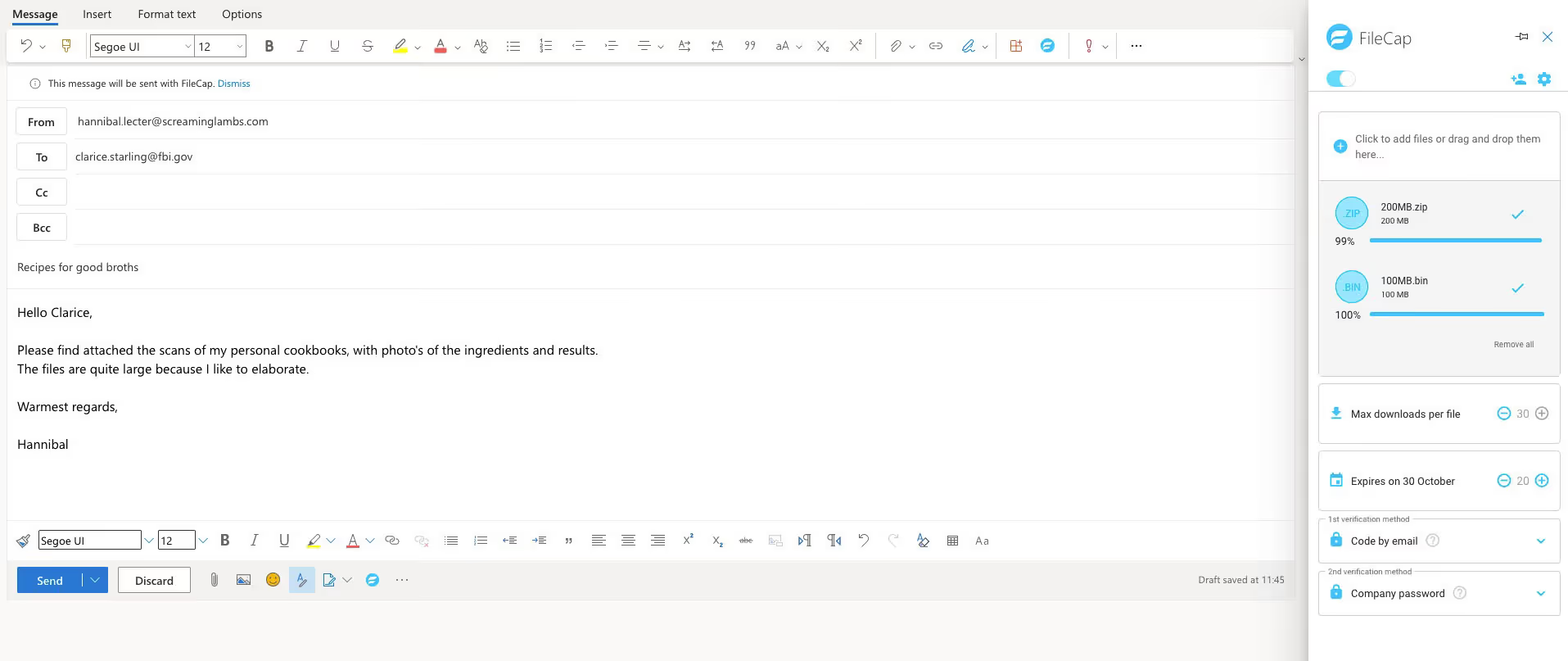
Do you use Microsoft Outlook or Office 365? If so, you can send large files without changing the way you work. With the FileCap add-in for Outlook, you can attach files directly to your email, regardless of their size. Here's how it works:
FileCap automatically replaces the attachment with a secure link. The recipient clicks on the link and gains access to the file without needing an account. This works for files ranging from a few megabytes to several terabytes.
Automatic check during sending: Did you accidentally attach a file that’s too large without using the FileCap button? If so, FileCap will detect this and offer to send the file via the secure environment. This prevents sensitive files from being sent unsecured.
Not everyone uses Outlook. With this tool, you can send large files directly from your browser. You can upload files by dragging and dropping them or selecting them manually, add recipients, and send them. This is ideal for:
Collaboration with external parties who do not use Outlook.
The portal works without requiring recipients to have their own FileCap account.
Sending large files securely involves more than just encryption during transmission. FileCap offers multiple layers of security that you can configure on a per-file or per-organization basis:
Virus scanning and file type checking: Each file is automatically scanned for malware. File types that do not comply with your organization's policy (such as .exe or .bat) are automatically blocked.
Access Control: Specify who is allowed to open the file for each send. You can require recipients to verify their identity before they are granted access.
Download limits and expiration dates: Set the number of times a file can be downloaded and how long the link remains valid.
Revocable links: Did you send a file to the wrong person? Revoke access with a single click, even after the recipient has already received the link.
Insights and logging: See exactly who has opened your file, when, and how often. This is not only useful for your own record-keeping, but also for reporting to regulatory authorities.
Services like WeTransfer, Google Drive, or SendGB offer free options for sending large files. That sounds appealing, but there are some drawbacks:
· Limited security: Free services rarely offer end-to-end encryption, access control, or enterprise-level virus scanning.
· No control after sending: You cannot revoke a sent file or restrict access to it after the fact.
· Data usage: Some free services use uploaded files for analysis, advertising, or AI training. Be sure to read the terms and conditions carefully.
· Lack of compliance: Free services are generally not suitable for organizations that must comply with the GDPR, NTA 7516, or sector-specific regulations.
FileCap isn't a free solution, but it does offer the security, control, and compliance that business users need.
FileCap is used by organizations that regularly exchange large or confidential files and do not want to compromise on security. Examples include:
· Healthcare: securely share patient records, test results, and medical images with referring physicians or patients.
· Legal services: exchanging contracts, court documents, and confidential correspondence with clients and opposing parties.
· Government: Share documents that comply with BIO guidelines and GDPR requirements.
· Business services: securely send financial statements, due diligence documentation, and audit reports.
With FileCap, you can attach large files to your emails in Outlook or Office 365 using the FileCap add-in. The file is automatically replaced with a secure link. The recipient opens the file via that link without having to install any software.
FileCap does not impose fixed file size limits like email does. You can send files ranging from a few megabytes to several terabytes, depending on your subscription.
Yes, but with enterprise-level security. While WeTransfer shares files unsecured via a public link, FileCap offers access control, virus scanning, revocable links, and comprehensive logging. FileCap is specifically designed for organizations that take security and compliance seriously.
No. Recipients open files via a secure link in their browser. They don't need to install any software or create an account.
FileCap was designed with privacy and compliance as its guiding principles. The solution helps organizations comply with the GDPR and the NTA7516 standard for secure email in the healthcare sector. All data is processed and stored within the EU.
Yes. With FileCap, you can revoke access to a sent file at any time. The recipient will then no longer be able to open the file, even if the link has already been shared.
Dropbox and OneDrive are cloud storage services: you share a folder or file from your own storage. FileCap is specifically designed for securely sending files, with features such as revocable links, download limits, virus scanning, and comprehensive audit logging—features that cloud storage services do not offer.
Find out how FileCap fits with your organization. Explore the features and pricing, or request a demo. Want to get started right away? Try FileCap for free.
The FileCap add-in makes sending a secure email or sensitive files child's play. Check out how it works below:
Invite someone to send you large files or a message securely with FileCap. Fast and simple!
Choose one of four available authentication methods: password, code via email, code via SMS or a company password. Sending extra sensitive information? Simply use a second verification.
Customize your FileCap portal with a large background, your company logo and, of course, matching colors. The emails that you send with FileCap will also automatically receive your house style. Very familiar for your customers.

By taking advantage of the additional security options, business rules to monitor the content of emails and messages and the ability to retract sent messages, you reduce the likelihood of data breaches.







































































FileCap has many more features. You can safely mail and receive (large) files and check outgoing messages for sensitive information via Business Rules. Want to know more?
Click here!